Before comparing prices or memory features, check the arm-size range printed on the cuff. If your arm measurement falls within that range and the cuff is compatible with your monitor, you may not need a new device.
This guide helps you check equipment information and organise home readings. It does not diagnose high blood pressure or tell you how to change medication.
A cuff that fastens may still be the wrong size
The US American Heart Association (AHA) recommends a validated automatic upper-arm monitor with a correctly sized cuff. The wrong cuff size can distort readings. Check that the monitor has been validated for the person using it, including during pregnancy or for children. Ask a clinician or pharmacist if you are unsure. AHA: home monitoring
Terms such as “adult,” “standard” and “large” do not give you enough information to compare two products. Look for the numerical range on the exact cuff or its instructions. A cuff may fasten around your arm even when your measurement falls outside its stated range.
Match three pieces of information
| What to record | What you need | If the information is missing |
|---|---|---|
| The user’s arm measurement | Name, date and upper-arm circumference in centimetres | Follow the measurement instructions for the intended cuff |
| The cuff’s supported range | Minimum and maximum arm circumference in centimetres | Find the exact cuff model in the manufacturer’s documentation |
| Monitor and cuff models | Both model names and official compatibility information | Ask the manufacturer about that specific combination |
Keep a separate row for each person sharing a monitor. Separate memory profiles do not mean the same cuff fits everyone.
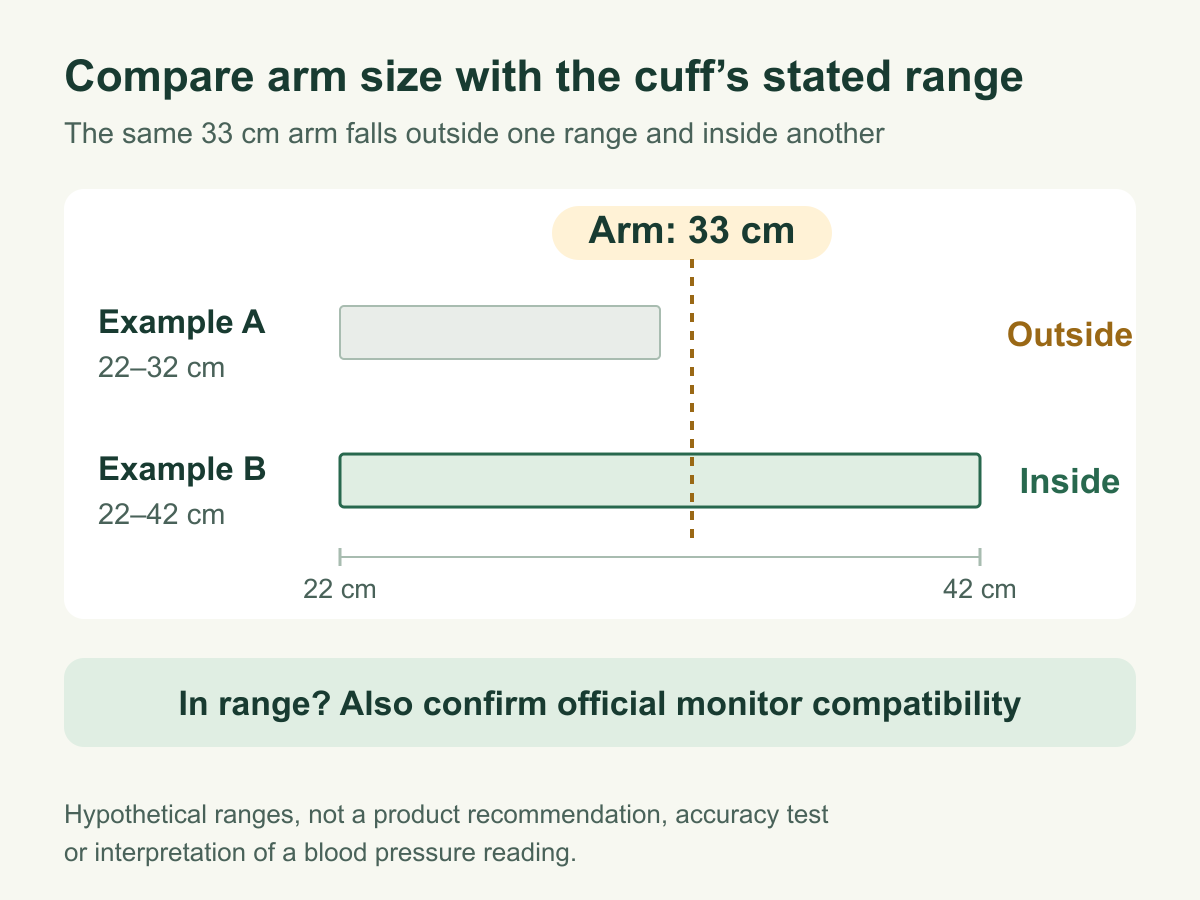
For a fictional arm circumference of 33 cm, the comparison would be:
| Fictional cuff | Stated arm range | What can be concluded |
|---|---|---|
| A | 22–32 cm | 33 cm is outside the range; do not choose it for this example |
| B | 22–42 cm | 33 cm is within the range; monitor compatibility still needs checking |
| C | Range not supplied | Fit cannot be confirmed from the listing |
These ranges are made up to show how the comparison works; they are not tested products. If your measurement is close to a boundary, check the manufacturer’s measurement position and selection instructions. Do not automatically choose the larger cuff or the cuff that produces a lower reading. A connector that physically fits is not proof of official compatibility.
Prepare for the reading, then record what happened
The AHA measurement sheet advises avoiding smoking, caffeine, alcohol and exercise for 30 minutes beforehand and emptying your bladder. Measure on a bare arm, with your back supported, feet flat, legs uncrossed and arm supported at heart level. Stay quiet; take at least two readings a minute apart and record them. AHA measurement instructions, PDF
Rest quietly for at least five minutes. Agree with your clinician on when and how often to measure. AHA: preparation
Use that plan together with your exact device’s instructions. You can copy the worksheet below onto paper or into a phone note:
| Date and time | Person and arm | Reading 1: systolic/diastolic, mmHg | Reading 2: systolic/diastolic, mmHg | Conditions or interruptions |
|---|---|---|---|---|
| ___ | ___ | ___ / ___ | ___ / ___ | Rest completed? Movement or talking? |
Keep the monitor model, cuff model and dated arm measurement in a separate note. You do not need to copy them beside every reading.
If you correct an entry, leave the correction visible so the original can still be read. If the device shows an error, record that rather than guessing a reading. If you moved or spoke, note what happened so your clinician can decide how to interpret the result. Do not keep measuring until you get a number you prefer and save only that result. Keep an app’s average separate from the individual readings it summarises.
Check what you have before buying another monitor
If your current cuff fits, its compatibility is confirmed and you can follow the instructions, an app or extra memory may not be reason enough to replace it. If the cuff size is wrong, compare the option of an officially compatible replacement cuff with buying a complete monitor.
If the listing is unclear, you can ask the manufacturer:
My monitor model is ___. My upper-arm circumference is ___ cm. Which cuff models are officially compatible, what arm ranges do they cover, and which selection instructions apply near a range boundary?
Check the exact model sold in your market, what the package contains, replacement-cuff availability and access to the instructions. Similar product names do not guarantee that these details match.
Bring your monitor and readings to an appointment so your technique can be checked, and continue your regular care. AHA: using your monitor
Know when a reading needs urgent action
Under AHA guidance, systolic above 180 mmHg OR diastolic above 120 mmHg without symptoms calls for another reading after at least one minute. If it is still very high, contact a healthcare professional immediately. With symptoms such as chest pain, breathlessness, numbness, weakness, vision changes or difficulty speaking, seek emergency help without waiting for the pressure to fall. AHA: very high readings
Use your local emergency number. These are US patient instructions, not diagnostic rules for every country or a complete list of emergencies. Do not dismiss serious symptoms while checking whether the cuff caused an error. Your clinician should set your individual targets, interpret your record and advise on medication; do not adjust treatment yourself.
For related everyday guidance, visit our Wellness & Recovery collection.
Sources checked: 8 September 2026. AI helped with research, drafting and adapting our Korean article into English. The comparison and recording forms are original editorial examples. We have not conducted hands-on device testing or a performance comparison.